If you suddenly see a tiny glowing dot – green or orange – at the top of your screen, don’t ignore it  You might be being watched
How to protect yourself and what these green and orange dots mean, explained in the link in the comments 
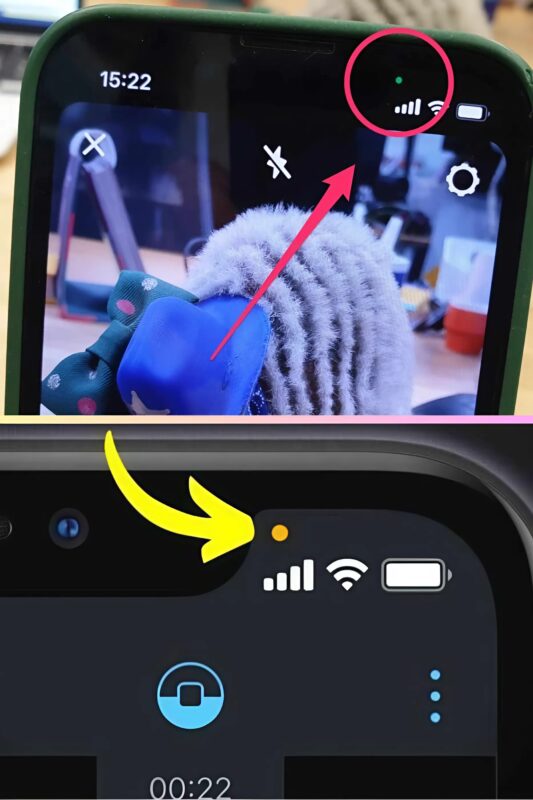
Recently, starting from iOS 14 on iPhones and Android 12 on Android phones, color signals have been introduced to warn users when the microphone or camera is active. This is part of the global trend to enhance personal data protection:
 Orange dot – means the microphone is on.
 Green dot – means the camera is on (sometimes also the microphone simultaneously).
According to developers, these indicators should only light up when you yourself allow the use of the camera or microphone, such as during a call, recording a voice message, a video chat, or filming.
But what if the dot appears without any obvious reason?
That’s when you should be suspicious. If no known apps are running but the indicator is on – it could be a sign of hidden access.
There might be spyware running on your device, silently recording audio or video.
How to check which app is using your camera or microphone?
 On Android:
Swipe down from the top of the screen to open the notification panel.

Tap the green or orange dot – information about the app using the microphone or camera will appear.
On iPhone:
Swipe down from the top right corner to open the Control Center.
At the top, you’ll see the name of the app using these functions.
If an unknown app appears or something you haven’t opened – that’s a serious cause for concern.
What to do if you think you’re being listened to or watched?
 Check your apps
Remove anything suspicious, especially apps you didn’t install yourself. Only download apps from Google Play or the App Store.
 Limit access to your microphone and camera

Go to Settings → Privacy → Camera/Microphone and turn off access for all non-essential apps.
 Update your system
Make sure you have the latest updates installed – these often close security vulnerabilities.
 Install antivirus software
A good antivirus program can help detect and remove potential “spies.